Appearance
The hosted connect flow
The hosted flow is how your users connect their bank: you create a connect session on your backend, send the user to the returned hostedUrl, and we take it from there — bank picker, consent, the bank's own OAuth, progress, and the redirect back to you. Your API key never touches the user's device, and the bank sees a real browser (banks block embedded WebViews).
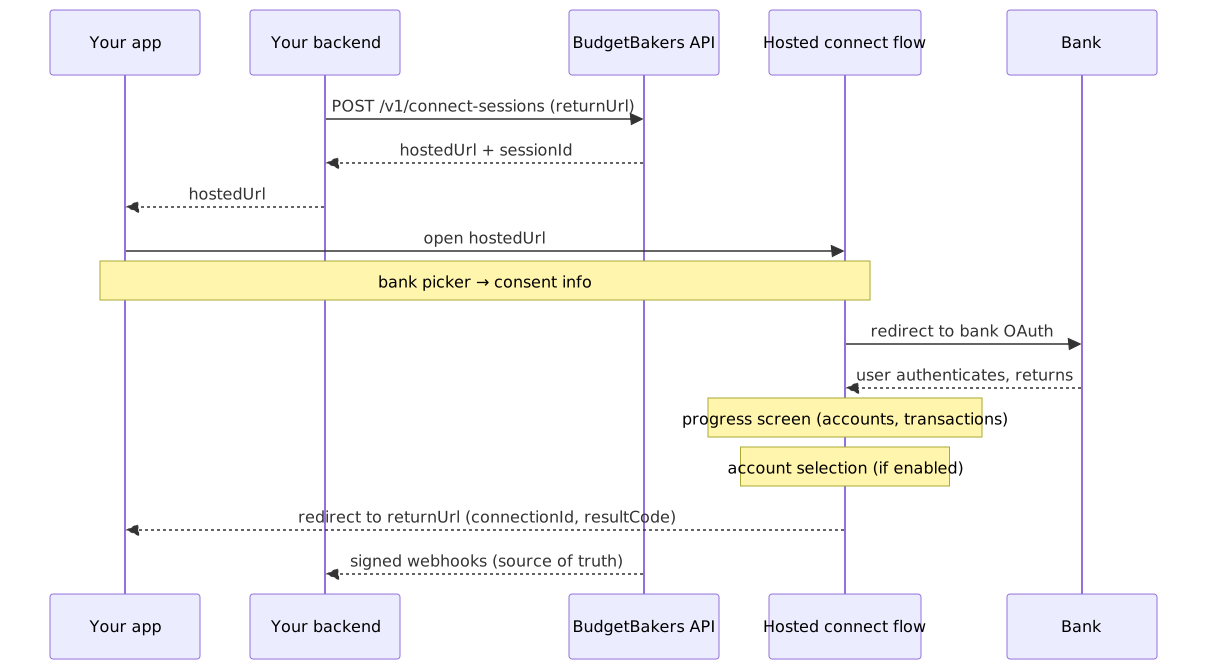
- Your backend creates a session:
POST /v2/connect-sessionswith thereturnUrlthis user should land on. - You open
hostedUrl: as a web redirect, or from your app in the system browser (see Mobile apps). - The user picks a bank (skipped if you set
providerId— or if you setconnectionId, which reconnects an existing connection). They see the consent info and are redirected to the bank's OAuth. - Back from the bank, a progress screen tracks the data download; if account selection is enabled for you, the user chooses which accounts to share before anything is downloaded.
- The user is redirected to your
returnUrlwith the result, and your backend receives the authoritative events as webhooks.
Connect sessions
sh
curl -X POST https://aisp-partner.bbapi.io/v2/connect-sessions \
  -H "X-Api-Key: {{BB_API_KEY}}" \
  -H "X-Client-Id: <clientId>" \
  -H "Content-Type: application/json" \
  -d '{ "returnUrl": "https://app.example.com/bb-callback" }'
json
{
  "sessionId": "cs_9c1e…",
  "hostedUrl": "https://aisp-connect.bbapi.io/s/<one-time-token>",
  "expiresAt": "2026-07-15T10:35:00Z"
}- The
hostedUrltoken is one-time — the first load consumes it. Hand it to the user immediately and never reuse it. expiresAtis the single expiry to honor. An expired session ends in theExpiredstate with a friendly screen; just create a new session.POST /v2/connect-sessionsaccepts anIdempotency-Keyheader — a retry with the same key replays the original response instead of minting a second session.- Optional fields:
locale(UI language),country(preselects the bank picker's country),providerId(skips the picker entirely),connectionId(reconnect — see below; the bank is implied, so send it instead ofproviderId, not alongside).
Track the session from your backend:
sh
curl https://aisp-partner.bbapi.io/v2/connect-sessions/<sessionId> \
  -H "X-Api-Key: {{BB_API_KEY}}" \
-H "X-Client-Id: <clientId>"| Session state | Meaning |
|---|---|
AwaitingBankSelection | user is in the bank picker |
RedirectedToBank | handed off to the bank's OAuth |
Authenticating | user is authenticating at the bank |
Fetching | accounts and transactions are downloading |
AwaitingAccountSelection | user is choosing which accounts to share; the download is paused until they confirm |
Completed | terminal — connectionId is set |
Failed | terminal — see the failure webhook for the reason |
Cancelled | terminal — user cancelled |
Expired | terminal — session outlived expiresAt |
The return redirect
The final redirect to your returnUrl appends connectionId, resultCode (Ok | Error | Cancelled), sessionId, and error on failure.
Two rules keep integrations robust:
returnUrlis allowlisted. The portal (Apps → return URLs) holds your registered patterns — web URLs, iOS universal links, Android app links, custom schemes. Each session passes the concrete URL for this user; it must match a registered pattern or the create fails withvalidation_error.- The redirect is a UX signal, not the result. Users close tabs and switch apps mid-flow; the redirect may never arrive. The authoritative outcome is the session state and the webhooks (
ConnectionCreateSuccess/ConnectionCreateFailed).
Account selection
If account selection is enabled for your integration, the flow stops after we have read the list of accounts covered by the bank consent and asks the user which of them to share. Nothing is downloaded until they confirm — an account the user leaves unchecked never has its transactions fetched, and the selection can never exceed what the bank authorized.
This makes the selection a consent, not a display filter:
- Selected accounts become
Activeand receive transaction downloads. - Unselected accounts end
Disabled. You still see them inGET /v2/connections/{id}/accounts— with their name, balance andsubscriptionStatus— they simply carry no transactions. - Widening the selection later is not possible; the user has to go through a reconnect (below), which shows the picker again with their previous choices pre-checked.
- On a reconnect, an account the bank no longer shares is shown to the user as ending and cannot be kept — consenting to it could not be honoured, since the bank would refuse to serve it. Expect such an account to come back
Disabledwith the transactions it already had; it is not deleted. - There is no per-account subscribe endpoint. The one way to withdraw is coarse and per connection:
PATCH /v1/connections/{id}/revoke.
The account status you read back tells you where each account stands:
subscriptionStatus | Meaning | Transactions downloaded |
|---|---|---|
Active | the user shared this account | yes |
Inactive | shared before, consent has expired | no — reconnect to resume |
Disabled | not shared (unselected in the picker) | never |
Unsubscribed | not part of this flow — legacy per-account subscription | n/a |
If the user abandons the picker, the attempt fails after an hour: you get ConnectionCreateFailed and the consent is revoked at the bank.
Connection lifecycle
A successful flow produces a connection — the durable link to one bank consent. Reading it (GET /v2/connections/{id}, .../accounts) is a /v2 call like everything else; the lifecycle actions below (reconnect, refresh, revoke, delete, direct create) are the one part of the API still served under /v1, until they get their /v2 aliases. It moves through four states:
| State | Meaning | Recovery |
|---|---|---|
Pending | transient during creation — never a resting state | — |
Active | authorized, consent valid | — |
Inactive | consent expired or revoked, or refreshes kept failing | reconnect → Active |
Disabled | the flow never completed (consent never obtained) | none — create a new connection |
- Consent expiry and revocation arrive as
ConnectionConsentExpired/ConnectionConsentRevokedwebhooks and flip the connection toInactive. - Reconnect repeats the bank authorization for an
Inactiveconnection and keeps the sameconnectionId— your account and transaction history stay attached. Two ways in:- hosted:
POST /v2/connect-sessionswithconnectionId— the user gets the same screens as a create, minus the bank picker, and the account picker at the end with their previous choices pre-checked. Nothing happens to the connection until the user openshostedUrl. - direct:
POST /v1/connections/{id}/reconnect, if you host the redirect yourself.
- hosted:
- Reconnecting a
Disabledconnection is rejected; start a new connect session instead.
Refresh never redirects
POST /v1/connections/{id}/refresh fetches new transactions in the background and returns 202 Accepted — there is nothing to show the user. If the bank demands re-authentication, the refresh fails, the connection goes Inactive, and reconnect is the recovery path. Refreshes are also guarded by a cooldown and per-day quotas — handle refresh_cooldown, refresh_in_progress, and refresh_quota_exceeded per the error reference.